






Flatbed vs Rotary Screen Printing: 5 Decisions for Label Buyers
Roll-to-roll describes how material enters and leaves a printing line. It does not tell you whether the printing screen is flat or cylindrical. For label purchasing, compare the screen mechanism, artwork repeat, press integration, tooling costs and results on your production stock before choosing between flatbed and rotary screen printing.
A rotating support cylinder can also work with a flat screen. Ask the supplier to show the printing form and its motion rather than classify a machine from the word “cylinder” in its name. This guide compares purchasing decisions within roll-fed label production. For the separate choice between individual sheets and continuous material, use our sheet-fed versus roll-to-roll guide.
1. Identify the screen, not just the material feed
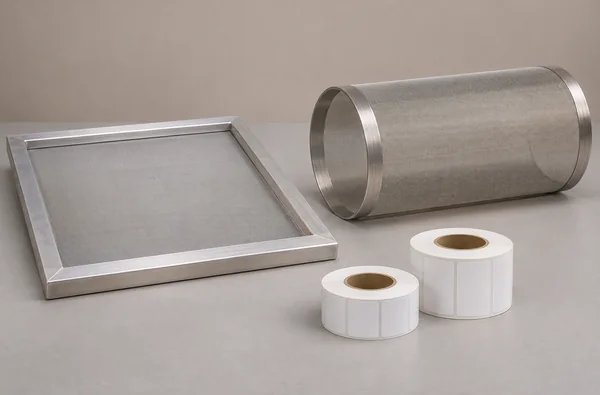
The Stuttgart Media University explanation of screen-printing mechanisms distinguishes a flat printing form from a cylindrical screen. In rotary screen printing, the screen rotates with the web while a squeegee inside it pushes ink through the image openings. A flat-screen cylinder press is a separate arrangement: its support cylinder rotates, but its printing form remains flat.
Spartanics explicitly offers flatbed roll-to-roll lines, demonstrating that flatbed and roll-fed are compatible descriptions. Do not assume that every flat-screen machine has the same web motion or that the whole web must stop during each print stroke. Request the sequence for the proposed configuration.
| Question | Flat-screen proposal | Rotary-screen proposal |
|---|---|---|
| What carries the image? | A flat screen in a frame. | A cylindrical screen. |
| What needs clarification? | Screen, squeegee, support and web movements through the print cycle. | Screen rotation, internal squeegee arrangement and synchronization with the web. |
| What should the quotation identify? | Frame specification, image window, material advance and supplied handling equipment. | Screen-cylinder format, mounting hardware and integration with the press. |
2. Check the artwork repeat against the tooling
Send several representative label layouts, especially jobs with different repeats. A single attractive sample cannot show how the equipment accommodates your order mix.
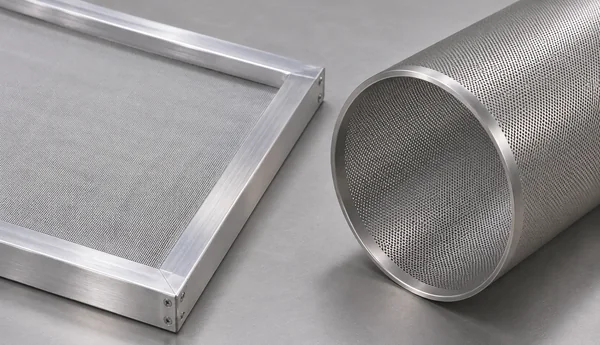
For a framed-screen proposal, check the image window and material advance separately. The published Winshol WL-350D UV configuration lists a screen-frame size, maximum print area and maximum feed length as different specifications. Those figures should be checked against the complete layout, including margins and registration references. They do not, on their own, describe every movement in the printing mechanism.
For rotary equipment, ask how the image repeat fits the available screen-cylinder formats. The Gallus Screeny unit documentation lists format sizes and screen rings. Ask each bidder for its own available formats and the hardware needed to change them.
Have each supplier mark which of your layouts uses existing tooling, which needs additional tooling, and which needs a layout change. Include the cost of preparing and storing the additional screens. Keep the actual drawing beside the quotation so a proposed repeat change is not mistaken for approval of the original artwork.
3. Decide whether you need a line or a printing unit
A standalone roll-fed line and a screen unit added to an existing label press solve different purchasing problems. Compare them only after assigning the operations already available in your plant.
Winshol’s WL-350D UV page describes a configuration combining unwinding, feeding, printing, UV drying and rewinding. By contrast, the SPGPrints Marble rotary unit is presented around integration and synchronization with a printing press. These are examples of supplied scope, not a claim that every flat-screen system is standalone or every rotary system is an add-on.
If you are adding a unit, identify the host press, available mounting space, web path, drive and control interfaces, and the drying equipment needed after the new layer. Ask who approves and commissions the combined arrangement. A statement that a unit is suitable for integration is not confirmation that it fits your particular press.
If you need a complete line, mark the incoming roll and the accepted output on a process drawing. List what is included between them and what remains a separate operation. Use the existing machine RFQ checklist for the wider project specification.
4. Compare tooling costs across your jobs
There is no useful universal order quantity at which rotary becomes the cheaper choice. A purchasing comparison needs the screen costs, setup work, consumables and accepted output for the jobs you expect to run.
Prepare a job list with artwork repeat, number of screen-printed layers, order quantity and expected reorder frequency. Ask suppliers to price first production and repeat production separately. For each route, include screen preparation, mounting hardware, cleaning, inspection, storage and replacement assumptions. Confirm what can actually be reused when the artwork returns.
Gallus’s guidance on reusing Screeny screens discusses the influence of screen choice, handling and press setup. Ask how screens will be inspected before reuse and what would require replacement.
For example, a buyer with frequent artwork changes should price the extra screens and preparation work for those changes. A buyer repeating the same layouts should examine storage, inspection and return-to-production requirements. These hypothetical cases need different cost sheets; both still need production evidence.
5. Approve the label effect before comparing output
Choose a physical reference for the screen-printed layer. State whether the requirement concerns an opaque white, a visible color, a varnish or a tactile detail, then define how the finished label will be judged. SPGPrints lists opaque and tactile label applications for rotary screens. Compare a sample of the required effect rather than treating it as exclusive to one printing mechanism.
Give both suppliers the same production stock and acceptance requirements. Ask each to identify the ink and screen used in its proposed process. Inspect the label after the later operations required by the order, including winding or converting where applicable. A sample accepted beside the printing unit may not represent the delivered label.
Once the effect passes, compare accepted output over the agreed job, including setup and rejected material. Do not compare a rotary unit’s mechanical speed with the finished-label output of a complete line. Our good labels per hour guide explains how to keep the measurement consistent.
What to send with the enquiry
Send the production stock, layered artwork, representative repeat sizes and a physical finish reference. Include your order mix and identify any existing press the new equipment must work with. Request a marked-up tooling and supply-scope comparison, with unresolved items clearly listed.
For a Winshol proposal, review the current roll-to-roll configurations and send your job details for configuration review. Ask for confirmation of the screen mechanism and complete production route for the quoted model. Catalogue dimensions are a starting point, not an approval of your application.
Frequently asked questions
1. Is roll-to-roll screen printing the same as rotary screen printing?
No. Roll-to-roll describes continuous material supplied and collected as rolls. Rotary describes a cylindrical printing screen. A roll-fed line can use a flat screen or a rotary screen, so confirm the printing mechanism separately.
2. Can a flatbed screen printer process label rolls?
Yes, when the equipment is configured for roll-fed production. Flatbed roll-to-roll lines are commercially available. Check the quoted unwinding, web transport, printing and collection arrangement rather than assuming a flatbed machine accepts only sheets.
3. Does a cylinder screen printer always use a rotary screen?
No. A flat-screen cylinder press uses a flat printing form with a rotating support cylinder. Ask which component carries the image and request an explanation of the screen and material movements.
4. Which process is cheaper for short label orders?
The answer depends on the actual jobs and quotation. Compare first-use tooling, setup, consumables, accepted output and repeat-order costs. Do not use a universal quantity threshold or machine price alone to select the process.
5. Why does print repeat matter when selecting rotary equipment?
The artwork must suit the available screen-cylinder format and the proposed press arrangement. Ask the supplier to map each required repeat to the screen and mounting hardware it needs, including any layout changes or additional tooling.
6. Can a rotary screen unit be added to an existing label press?
Some suppliers offer units for press integration. Suitability must be confirmed for the particular host press, web path, controls and drying arrangement. Identify who approves and commissions the combined equipment before ordering.
7. Is rotary screen printing always better for tactile varnish?
No universal preference follows from the process name. Define the required finish and inspect samples made on the intended stock with documented consumables. Compare the finished label after its required winding and converting steps.
8. What should a fair flatbed-versus-rotary trial compare?
Use the same artwork, production stock and finished-label acceptance requirements. Record each route’s tooling, ink, setup, rejected material and accepted output. Include any additional operations needed to deliver the agreed label.