


Screen Printing Web Width vs Print Area: Will Your Label Artwork Fit?
A roll of material can fit through a screen printer while the image on it is too large for the printing station. Maximum web width tells you the widest material a listed configuration can handle. Maximum print area limits the image that station can print. Check both against a dimensioned artwork drawing, then check the repeat against the listed feed length. A sample trial on production stock is still needed before approving the job.
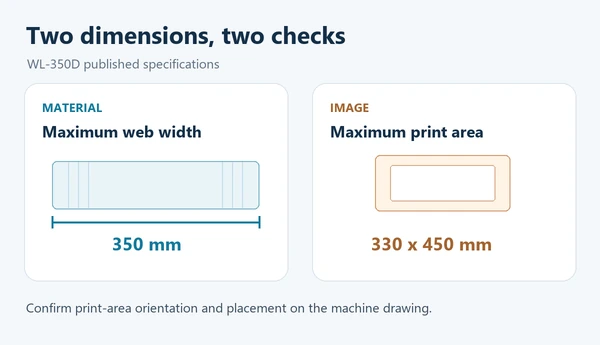
Winshol’s WL-350D, for example, lists a 350 mm maximum web width, a 330 × 450 mm maximum print area and a 450 mm maximum feed length. The 350 mm figure is a material limit; it is not a promise that the machine can print a 350 mm-wide image.
Four catalogue dimensions that answer different questions
Start with the dimensions on the machine page, then map each one to a dimension on the job drawing.
| Catalogue term | What to compare it with | What it does not establish |
|---|---|---|
| Maximum web width | The full width of the roll that must pass through the line | The width of the printable image or usable edge margin |
| Maximum print area | The outer bounds of everything this screen station must print | Whether the print can be placed at the required position on the web |
| Maximum feed length | The proposed repeat along the feed direction | Approval of a finished-label repeat or a production speed |
| Screen frame size | The frame called for by the machine configuration | The printable area; use the separate print-area specification |
The numbers must also be matched to the machine and cross-web directions. Catalogue tables do not always label which print-area dimension runs across the web. Ask for a marked layout drawing before treating the first number in a pair as the usable print width.
What the published Winshol figures show
These two models serve different jobs, but their published dimensions show why both numbers belong in an artwork review.
| Published model | Maximum web width | Maximum print area | Maximum feed length |
|---|---|---|---|
| WL-350D UV roll-to-roll screen printer | 350 mm | 330 × 450 mm | 450 mm |
| WL-5080CCD-Y CCD registration screen printer | 520 mm | 500 × 800 mm | 800 mm |
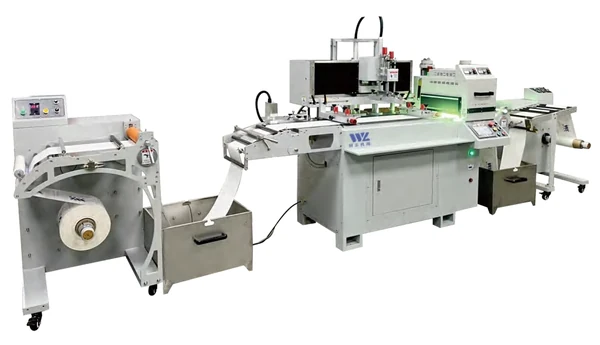
The WL-350D page also lists a 550 × 700 mm screen frame; the WL-5080CCD-Y lists an 800 × 1000 mm frame. Neither frame size replaces the print-area figure when you check artwork fit. The WL-5080CCD-Y uses CCD visual registration and hot-air drying, while the WL-350D listing is a single-color UV configuration. Choose the process after checking the layout.
Draw the job in two directions
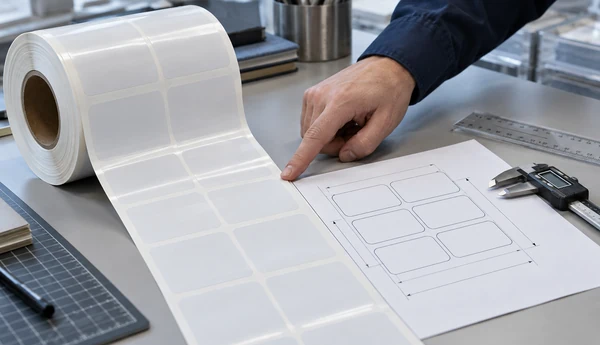
On one artwork sheet, mark the cross-web direction and the direction the roll feeds. Dimension the full material width, the outer edge of every area to be printed by the proposed station, and the distance from that printed area to each web edge. Add the print repeat and the locations of any existing registration marks or die-cut references.
Use the outermost printed boundary, not just the finished label size. A white underprint, varnish patch, printed bleed or foil adhesive image may extend beyond the visible label graphic. If the screen station must print a new registration mark, include that mark in the printed boundary too. A mark already printed in an upstream process is different: it still needs a usable camera view, but it is not part of this station’s new inked image.
For a multi-up layout, show the full array across the web rather than the width of one label. If separate jobs share a web, dimension the complete printed spread and the spaces between lanes. The equipment team can then check the actual artwork placement instead of inferring it from the roll’s nominal width.
A 350 mm web: what the arithmetic can and cannot tell you
Suppose a customer supplies a 350 mm roll for the WL-350D and the widest printed element is 320 mm. A 3 mm printed bleed on each side makes that element’s total printed span 326 mm. If Winshol confirms that the 330 mm side of the stated print area runs across the web, 326 mm passes that first numerical comparison. It does not yet confirm that the image can sit where the die-cut and existing print require it.
Now suppose another printed layer extends to 334 mm across the web. Under the same confirmed orientation, it exceeds the listed 330 mm print-area dimension even though the 350 mm roll fits the material path. The artwork would need to change or the job would need a configuration with a suitable print envelope.
The difference between the catalogue’s 350 mm web width and 330 mm print-area dimension is 20 mm. It is not a guaranteed 10 mm printable margin on each side. Web guiding, image placement, marks and the actual machine layout need a drawing and a trial. Do not promise full-width coverage by dividing two catalogue maxima.
Check the repeat without confusing it with print length
Width is only half the artwork fit. Mark the proposed repeat along the feed direction and show the longest printed element within that repeat. Compare both with the model’s stated print-area dimension and maximum feed length. On the WL-350D page, the print-area pair is 330 × 450 mm and maximum feed length is 450 mm. Those are separate specifications even when a number happens to match.
The product page does not by itself establish how a particular gap, mark position or finishing repeat will run on the quoted line. Share the actual layout and material sample, especially if the design is close to a listed limit. For general machine selection beyond artwork dimensions, see our roll-to-roll screen printing guide.
Send a layout that can be checked and trialled
Before requesting a machine recommendation, send the equipment team:
- The production roll or a representative sample, with its measured width, thickness and printed side.
- Layered artwork showing the widest image this station will print, including bleed, varnish, underprint or other printed features.
- A dimensioned drawing with web edges, feed arrow, lane positions, image placement and repeat length.
- Any preprinted features, registration marks and die-cut references that the new layer must match.
- The ink and curing route, the number of print colors, and the finished-part points where alignment will be judged.
Ask for the proposed machine layout with the web and print envelope marked in the same directions as your drawing. If the artwork is near a published limit, trial the production material and inspect the finished samples at the specified points. Confirm the final placement against the approved drawing and samples.
For a broader list of RFQ inputs, use the screen printing machine RFQ checklist. If the job uses preprinted film and CCD alignment, the registration-mark artwork and sample guide covers the camera reference separately.
Common questions
1. Can a machine that accepts a 350 mm web print a 350 mm-wide image?
Do not infer that from web width. The published WL-350D UV configuration accepts a web up to 350 mm wide but lists a 330 × 450 mm maximum print area. Confirm the orientation of that print area and the image position on a job drawing.
2. Is maximum print area the same as finished label size?
No. The machine must accommodate the full image printed at that station. Bleed, an underprint, varnish or a multi-lane layout can make the printed boundary wider than one trimmed label.
3. Does a larger screen frame mean a larger printable area?
Not automatically. The WL-350D lists a 550 × 700 mm screen frame and a 330 × 450 mm maximum print area. Compare artwork with the print-area figure, then confirm the required frame with the equipment team.
4. Does maximum feed length equal my label repeat?
It is a limit to check against the proposed layout, not a finished-job approval. Show the repeat, printed length and mark positions on the drawing so the machine team can review the actual feed sequence.
5. Should registration marks be included in the print-area measurement?
Include a mark if the proposed station will print it. If it is already on the incoming material, show its position separately so the camera view and finished-print alignment can be assessed.
6. If my artwork is smaller than the listed print area, is the job approved?
It has passed only one size check. Placement on the web, feed repeat, material behavior, registration and curing still need review with the intended machine configuration and production stock.
7. Should I move to a wider machine as soon as the printed image exceeds one listed dimension?
First confirm how the two print-area dimensions map to the web and whether the artwork can be rearranged without changing the finished requirement. If the required image still exceeds the confirmed print envelope, ask for a larger-format configuration and trial it with the same acceptance drawing.
Send your dimensioned artwork and production material through Winshol’s contact page for a layout review before choosing a model.
