


Single-Color vs Multicolor Screen Printing Machines for Labels
A single-color screen printing machine suits a one-stage label job or a demonstrated sequence of separate passes that meets the order requirements. A multicolor line is worth comparing for recurring jobs with several screen-printed layers. Choose the station count from the complete layer sequence, then verify registration, curing and accepted output on the actual material.
Winshol’s WL-350D UV, WL-350S and WL-350-3C provide single-color, two-color and three-color roll-fed configurations. This guide compares those UV versions for labels supplied on a continuous web. The choice should follow the complete label construction, typical order sizes and a trial with the actual materials.
Single-color vs multicolor screen printing: the practical difference
A single-color press has one printing station in the proposed route. A multicolor line has several stations that can be assigned to the agreed printing sequence. A station may apply an image color, white or a compatible coating, according to the approved process.
For a label with several layers, the single-color proposal needs a return-pass procedure. Have the supplier show how the material is reloaded and registered, including which surfaces contact the equipment after earlier printing.
| Decision point | Single-color route | Multicolor route |
|---|---|---|
| Printing sequence | One stage per pass through the printing station, unless the approved job requires additional operations | Several assigned stages can be coordinated within one configured line |
| Additional layers | Need a confirmed return-pass or downstream arrangement | Need enough suitable stations, with any extra operations separately identified |
| Registration | Re-establish the required references after return feeding | Demonstrate alignment between stations on the moving web |
| Setup work | Screen and ink changes between separately produced layers | Set up and check each participating station |
| Material handling | Include intermediate rolls and handling between passes | Review the complete web path through all stations and curing units |
| Capacity comparison | Count accepted labels after the full pass sequence | Count accepted labels after all quoted inline stages |
| Purchase scope | One printing station with the required curing and web handling | Multiple stations with the specified curing, transport and controls |
Compare both routes at the same endpoint. A roll carrying only the first color and a roll carrying the completed construction represent different amounts of work.
Count printing stages before counting machine colors
Prepare a layer drawing that identifies every operation applied to the label. Separate screen-printed layers from flexographic, digital or other work supplied elsewhere. Include an existing image when the new screen print must align to it.
Consider a hypothetical transparent label with two visible spot colors. A separately screen-printed white layer and clear finish bring that construction to four stages. The table gives a possible sequence for discussion. Approve the actual layer order with the material and ink suppliers.
| Hypothetical stage | Function in this example | Information to specify |
|---|---|---|
| White layer | Provides the specified background coverage | Artwork boundaries, opacity requirement and ink deposit |
| Spot color A | Prints the first image color | Color reference and relationship to the white layer |
| Spot color B | Prints the second image color | Color reference and alignment to the earlier print |
| Clear finish | Applies the specified protective or decorative layer | Coverage, finish and finished-product tests |
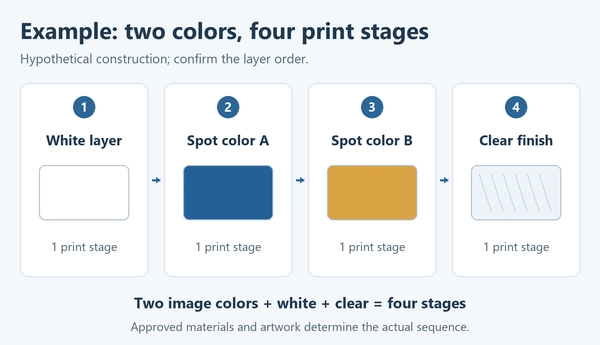
These stages apply only if the selected construction requires them and each is screen printed. A label made on white stock may have a different layer plan. A second deposit of the same ink may add an operation when the approved recipe calls for it.
Gallus’s overview of rotary screen printing describes varnish reliefs and other label effects. It illustrates why a finishing layer can add a printing operation beyond the visible image colors. Its rotary-process examples do not establish the capability of a particular Winshol configuration.
A four-stage construction needs an additional confirmed operation when three stations are available. Ask the supplier to draw the full route, showing where each layer is printed, cured and inspected.
When a single-color machine is worth evaluating
Start with a single-color proposal when the recurring work is genuinely one stage: for example, a specified single-color image or an additional screen layer on already printed label stock. Confirm the material, image coverage and alignment requirements for that operation.
For mixed work and smaller batches, compare changeover time and the quoted equipment scope with the multistation alternative. Include screen preparation, curing, cleaning and roll handling in both proposals so the price comparison covers the same work.
For a job with several layers, obtain a written return-pass procedure. It should identify the winding orientation, registration references, intermediate storage and contact with rollers or printing supports. Check whether each printed surface can withstand the next feeding and printing operation.
Include the complete sequence in the capacity estimate. Screen changes, ink changes, reloading and any waiting period between layers all affect the result. A single-color route becomes a practical candidate when that demonstrated sequence meets delivery requirements at an acceptable cost per finished label.
List the additional label constructions you expect to sell. The supplier can then explain which would need more passes or additional equipment, with the return-feeding or equipment interfaces identified in the proposal.
When a multicolor line is worth evaluating
Recurring two- or three-stage orders give you a reason to compare a multicolor line. It can group the assigned operations in one configured route once the materials, curing and registration have been approved. Compare the time spent setting up those stations with the work saved between separate passes.
For repeated two-stage work, compare a coordinated two-station trial with the complete two-pass alternative. The useful result is accepted output and the resources used to produce it. Two stations do not establish twice the finished production rate.
Three stations may suit a recurring three-stage construction. The third stage could be another image color or a separately specified layer. A proposed clear, white or special-effect operation needs the screen, ink and process review appropriate to that material.
Review the mix of one-stage and multilayer orders in your schedule. Record batch lengths and artwork changes, with the planned use of each station. For one-stage jobs, have the supplier demonstrate how unused heads and dryers are managed during setup and production.
Review material contact, curing exposure and cooling along the full line. A change at an early station may affect a later layer, so the operating procedure should identify the checks and adjustments needed before production resumes.
Compare the three Winshol UV configurations
Use the catalogue data to check the proposed format and installation scope. The following comparison refers specifically to the single-color WL-350D UV version, the WL-350S two-color UV line and the WL-350-3C three-color UV line.
| Catalogue item | WL-350D UV | WL-350S | WL-350-3C |
|---|---|---|---|
| Printing configuration | Single color; one station | Two colors; two stations | Three colors; three stations |
| UV drying equipment | One unit with two lamps | Two units, each with two lamps | Three units, each with two lamps |
| Maximum print area | 330 × 450 mm | 330 × 450 mm | 330 × 450 mm |
| Maximum web width | 350 mm | 350 mm | 450 mm, as listed in the catalogue |
| Maximum feed length | 450 mm | 450 mm | 450 mm |
| Screen frame size | 550 × 700 mm | 550 × 700 mm | 550 × 600 mm |
| Listed dimensions, L × W × H | Main machine: 2500 × 1100 × 1700 mm | Main machine: 4300 × 1100 × 1700 mm | Machine: 9500 × 1200 × 1700 mm |
| Main machine supply | 220 V | 220 V | 380 V |
| UV equipment supply | Confirm in the quotation | 380 V | 380 V |
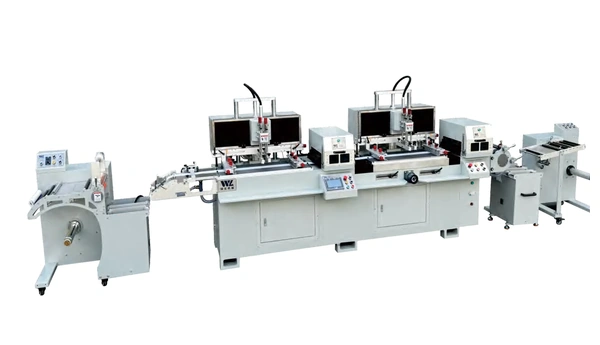
The WL-350D UV configuration includes unwinding, material feeding, one printing station, UV drying and rewinding. Other WL-350D catalogue versions use different drying arrangements, so specify the UV version in the enquiry.
The WL-350S lists two independently controllable print heads, with unwinding, feeding, two UV units and rewinding. Review how those heads and dryers will operate for each proposed layer sequence.
The WL-350-3C lists guided unwinding, three printing stations, three UV units and a rewinder. Its catalogue web width is 450 mm; the model name should not be used to infer a 350 mm limit.
All three list the same maximum print area, even though their web widths and frame sizes differ. Check the full repeat, registration marks and handling margins. Our web width versus print area guide explains these separate limits.
The dimensional entries also have different descriptions. Obtain a complete installation drawing for each quoted line, including auxiliaries, access and reel loading. Confirm the electrical schedule for the full arrangement rather than estimating total load from the listed motor ratings.
Check registration and curing on the complete construction
Define registration at the features that matter
Mark the positional requirements at the relevant artwork features, such as white-to-color edges, clear windows or coating boundaries. Record the reference and measurement method on the trial document. That gives both teams a defined basis for accepting the printed alignment.
For separate passes, measure the required alignment after each return through the machine and relevant curing stage. Record intermediate winding and storage conditions. For a multistation line, inspect identified repeats across the web and along the agreed run after all participating stations have operated.
Web guidance controls the material path. The registration review concerns where each printed feature lands relative to the specified reference. Request a demonstration of the actual system on the proposed stock; these catalogue listings do not provide a numerical registration guarantee.
Approve curing and adhesion through every layer
Obtain the technical data sheet for each ink or coating and identify the specified curing system. A listing of two UV lamps does not establish LED wavelength, delivered output or compatibility with the selected ink.
Nazdar’s July 11, 2026 data sheet for 2800 Series, revision 10, gives separate LED and mercury-vapor conditions and calls for checks on cooled prints. It describes adhesion problems from undercuring and possible loss of subsequent-layer adhesion from overcuring. Use this as an ink-specific example. A proposed Winshol process still needs validation with its selected ink and stock.
During the trial, record the actual curing settings for each stage and check the completed construction. Include intercoat adhesion, appearance and the specified resistance tests. If the web will be rewound, inspect it after the agreed hold for blocking or print transfer.
Use the actual label stock, including the liner and any earlier printing. Inspect dimensional change and the finished winding condition through the complete route. The UV curing versus hot-air drying guide covers the wider drying-method comparison.
Compare job cost and accepted output
Use one job specification and one finished-output unit for both proposals. State the number of labels per repeat, the complete layer schedule and whether cutting or another finishing operation is included. Keep work outside the quotation identified in the comparison.
State what the measured time includes. A full-job comparison covers setup, screen and ink changes, running and intermediate handling, plus the checks before accepted production resumes. You can report steady-production output separately, provided setup remains visible and both routes use the same scope.
Calculate cost per accepted label from the total defined job cost divided by the accepted label count. Include labor, materials, setup waste, energy and agreed machine-cost allocation on the same basis. Add any outside processing and finishing costs needed to reach the chosen endpoint.
Compare several representative orders using their actual batch lengths and reorder frequency. Add installation, training, maintenance and spare parts to the equipment review. Determine any economic crossover from those assumptions and the trial results; a three-station machine has no universal break-even order quantity.
Ask the supplier to support output estimates with the proposed material and artwork. A machine-cycle setting, lamp count or number of print heads cannot establish the accepted rate through the whole job.
Use a material trial to decide between the routes
Trial both proposals with the same artwork revision and production-grade stock. Agree on the finish and measurable acceptance limits beforehand. Include the demanding coverage areas and alignment features at production scale so the run tests the job you intend to sell.
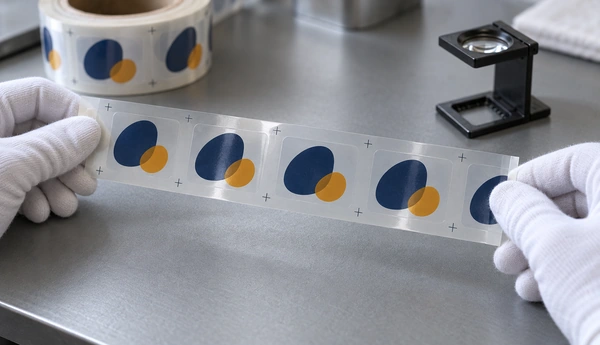
The trial report should retain:
- Material and ink identification, including earlier printing and coatings.
- Every screen-printed layer, its station or pass, and its curing settings.
- Sample positions across the web and along the agreed run.
- Registration, appearance, adhesion and other required test results.
- Setup time, operating time, intermediate handling and accepted output.
- Rejected material and the recorded causes.
Where the job needs rewinding and storage, include that stage in approval. Keep representative finished samples and the corresponding process records. State which checks take place later and who is responsible for them.
Send the layer drawing and order profile with the screen printing machine RFQ checklist. Request a quotation that identifies the complete route, supplied equipment and responsibilities for any additional operation.
Frequently asked questions
1. What is the difference between single-color and multicolor screen printing machines?
A single-color configuration has one printing station in the proposed route. A multicolor line has several stations for an agreed sequence of colors or compatible layers. Compare their output after the complete construction has been printed, cured and inspected.
2. Can a single-color screen printer make multicolor labels?
It can be considered for separate passes when the supplier confirms return feeding, registration, curing and handling of earlier layers. Approve that complete sequence with the actual stock and artwork. The single-color catalogue listing alone does not establish a repeat-pass capability for every job.
3. Does a two-color label always need a two-station machine?
Count every operation in the approved construction. Two image colors plus a separately screen-printed white layer and clear finish make four stages in the example above. The supplier must identify how all required stages are produced, whether inline or through additional operations.
4. Can a three-color machine print any full-color label?
Check the approved separations. Conventional CMYK work uses four process inks; white or other finishes can add stages. Three stations do not by themselves provide a complete four-process-color route. Confirm the required separations, equipment arrangement and sample result with the supplier.
5. Which Winshol models provide one, two and three printing stations?
The WL-350D UV is listed as single color, the WL-350S as two color and the WL-350-3C as three color. All list a 330 × 450 mm maximum print area. Web width, screen frame and installation details differ and need separate checks.
6. Can a multicolor machine run a single-color job?
Confirm the proposed operating mode, including unused print heads, web transport and UV settings. WL-350S lists independently controllable heads. Ask for the relevant setup and changeover demonstration on the quoted configuration rather than assuming every station can be bypassed in the same way.
7. Does adding printing stations guarantee higher output?
Measure accepted labels over a defined period after all required stages. Compare setup, curing, handling and waste on the same basis. Additional stations can change the production route, but a two- or three-station listing does not establish a proportional increase in finished output.
8. What should I send for a machine recommendation?
Send the label stock and roll specification, complete artwork and layer sequence, ink data, registration and finished-product requirements. Add representative batch sizes, target accepted output, available space and site utilities. Identify existing equipment and any operations you intend to outsource.
Discuss your label printing sequence with Winshol
Send Winshol your label artwork and material specification with the complete layer sequence and typical order sizes. Request a comparison of the single-color route and a suitable multistation UV configuration. Agree on the trial, then put its measured quality and accepted output into the quotation’s equipment scope and acceptance conditions.