

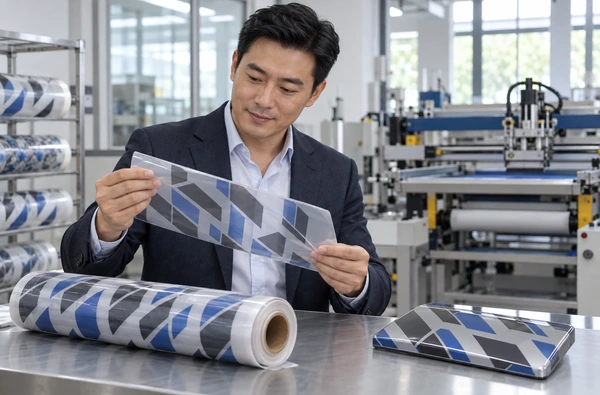
How to Choose a Screen Printing Machine for Water Transfer Film
Choose a screen printing machine for water transfer film by identifying the transfer process and exact carrier grade first. Check the complete print layout, material handling, registration and drying requirements against the proposed machine. Approve samples after water transfer onto the intended product, and include a storage check if printed material will be held before use.
Winshol lists water-transfer applications for the WL-5080CCD and WL-5080DW. Both are roll-fed screen printing configurations. Their catalogue specifications provide a starting point for selection; suitability for a particular carrier, ink and transfer system needs a material trial.
Define the water-transfer process before choosing equipment
Start the enquiry with the actual transfer method. “Water transfer film” can refer to different constructions, so send a carrier sample and a finished part. Photographs of the application steps can help the supplier understand how the material will be used.
Water-slide decals
In a water-slide process, wetting allows a printed decal to separate from its backing and slide onto the receiving surface. Nazdar’s water-slide decal procedure describes screen printing a clear carrier layer and image colors onto transfer paper, with an optional final clear layer. This is a specific paper-based example. The carrier and layer sequence for another transfer construction must come from its material supplier.
Identify whether the material arrives as sheets or rolls. The two Winshol models discussed here are roll-fed configurations. A process developed on transfer-paper sheets needs a separate feeding review before it can be proposed for either machine.
For a positioned decal, show the image location on the receiving product, the appearance of the surrounding clear area and any required protective finish. A successful print trial should reach that finished state.
Hydrographic dipping
TWN Industries describes hydrographic water transfer as decoration using printed water-soluble film, activation and dipping, followed by rinsing, drying and a protective clear coat. Its films use polyvinyl alcohol, or PVA. This route has different material and application requirements from sliding a decal off transfer paper.
If the enquiry concerns PVA hydrographic film, supply the exact film and ink system for review. Winshol’s catalogue lists water-transfer applications without specifying a qualified PVA grade, activator or dipping recipe. Ask the equipment and consumable suppliers to establish whether the proposed screen printing configuration suits that particular construction.
For either route, ask the quotation to show the printing stage and each operation after it. Confirm which equipment is included for water application, rinsing and finishing.
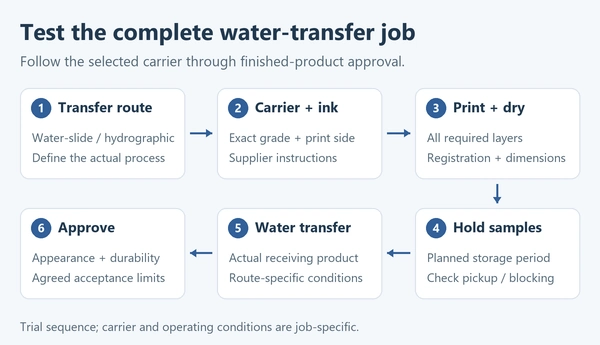
Specify the carrier and its handling conditions
The material specification should name the manufacturer and grade, with the thickness, coating and printable side. For a supported or multilayer carrier, describe which layers remain during printing and which are removed during transfer. Attach the consumable supplier’s storage, preparation and application instructions.
Add the reel details: web width, core size, maximum roll diameter, roll weight and winding direction. The supplier needs these dimensions to confirm the unwinder and material path, alongside the catalogue’s web-width limit.
For PVA hydrographic film, TWN’s storage guidance identifies sensitivity to moisture and temperature. Obtain the specified conditions for the grade being purchased. Record room conditions and the time the trial roll spends out of its packaging. Use the same preparation procedure when comparing samples.
Trace the carrier through the line. Identify the face that meets each roller and the support beneath the screen. On a later printing pass, check where the printed layer touches equipment. Keep the tension settings and rewind method with the trial record.
The WL-5080CCD catalogue lists suction-assisted feeding and handling intended to reduce scratches. Test the finished surface using production material. Inspect fine printed detail as well as areas where roller marks or scratches would remain visible after transfer.
Keep samples from the incoming roll and after drying. Check for curl, creases or a change in repeat dimensions. If the carrier cannot travel through the proposed path without damage or unstable positioning, resolve that handling problem before judging the image quality.
Check the full artwork repeat and printing sequence
Both models list a maximum print area of 500 × 800 mm and a maximum feed length of 800 mm. Their maximum web widths differ: 520 mm for the WL-5080CCD and 510 mm for the WL-5080DW. Show the feed direction on the layout so the supplier can confirm how the two print dimensions apply to the job.
Submit the complete repeat drawing with registration marks, clear coating boundaries and any cutting references. Include the distance between repeats and the edge space needed for handling. A nominal image size that fits inside 500 × 800 mm still needs a layout review once these details are added. The web width versus print area guide explains how to check the available format.
For example, a 480 × 760 mm image falls within the stated print dimensions. Registration marks outside that image or a wider clear carrier layer may increase the printed area. A marked-up layout from the supplier should show the complete area each screen will print.
Draw every layer in the proposed sequence. Depending on the approved transfer system, the job may include image colors, a white backing or a clear carrier or protective layer. Show which operations use screen printing and where drying occurs. Consumable instructions determine the layer order and artwork orientation.
The WL-5080DW is listed as a single-color configuration. For an enquiry involving several layers, have Winshol describe how each layer would be produced, including any additional passes and handling. The WL-5080CCD catalogue also needs a configuration review before a particular multicolor production route can be quoted.
Agree which features on the receiving product require exact placement. A small word, border or symbol may need a different acceptance limit from a decorative pattern. Include those limits with the drawing.
Compare the two Winshol configurations
Use the catalogue values to check format and installation requirements, then compare measured samples from the proposed job.
| Catalogue item | WL-5080CCD | WL-5080DW |
|---|---|---|
| Listed application relevant to this guide | Water-transfer films | Water-transfer printing |
| Registration configuration | CCD visual registration | Three-point registration |
| Drying configuration | Hot-air dryer | Drying oven |
| Maximum web width | 520 mm | 510 mm |
| Maximum print area | 500 × 800 mm | 500 × 800 mm |
| Maximum feed length | 800 mm | 800 mm |
| Screen frame size | 800 × 1000 mm | 800 × 1000 mm |
| Listed main machine supply | 380 V | 220 V |
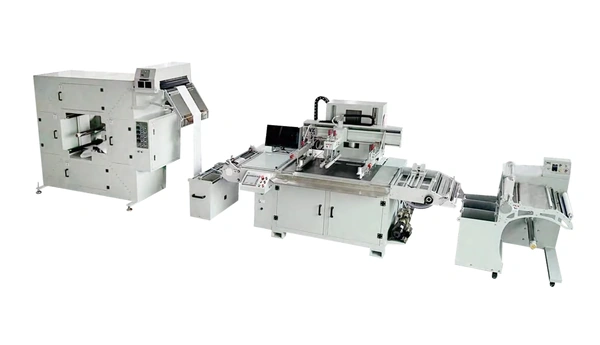
The WL-5080CCD lists right-side feeding and a moving screen. Check how that arrangement fits the floor space, roll loading and operator access. Obtain a complete line drawing for either quotation, including drying equipment and the space needed to handle material between printing stages.
The table gives the listed main machine supply. Request the complete electrical specification, including the dryer supply and connected load, with the configuration drawing.
The catalogue entries leave numerical registration accuracy and accepted output for the complete route unspecified. Compare those requirements in a timed trial using the same materials, artwork and acceptance limits.
Measure registration before and after drying
Define the relationships that need to stay aligned: color against color, image against a clear layer, or print against a later cut. Agree how the samples will be measured and where the measurements will be taken across the repeat.
For the WL-5080CCD, send the actual registration marks and the film carrying them. Review visibility, contrast, mark position and the layers that will already be present when the camera reads them. The CCD registration-mark checklist covers artwork preparation for this review.
Have the supplier demonstrate the WL-5080DW’s three-point registration against the same job requirements. Review the positioning procedure and adjustment available in that configuration.
Measure samples after drying and handling. Record internal image dimensions as well as displacement from a reference mark. Measurements near the corners and center can help reveal a change in repeat dimensions that one reference point would miss.
Take samples during stable running and later in the roll, with startup material recorded separately. For jobs that require several printing passes, retain samples from the full sequence. Agree an inspection schedule that is long enough to represent the intended production run.
After water transfer, inspect the features that matter on the finished part. Keep the printed-carrier measurements alongside those finished samples so any change introduced during application can be investigated.
Match the ink and dryer to the transfer construction
Obtain technical instructions for every printed layer. These should cover the carrier, ink series, additives, screen specification, drying or curing method and any waiting period before the next operation. Provide them when requesting a machine configuration.
“Water transfer” describes the application route. The selected ink’s technical sheet should identify its chemistry and drying or curing method. Use those instructions when reviewing the dryer.
Nazdar’s water-slide screen printing example uses named solvent-based clear and color inks. It notes the role of airflow and the risk of blocking when printed sheets are stacked warm. That guidance applies to its paper-and-ink construction. Establish the process for the actual film and consumables in the enquiry, then trial it on the quoted equipment.
For the WL-5080CCD’s hot-air dryer or the WL-5080DW’s oven, request the usable temperature range, material path, airflow, exposure time and cooling arrangements. Compare these with the ink instructions and the carrier’s processing limits. A dense clear layer and a fine image may impose different drying requirements, so include both in the test artwork where the job uses them.
An ink that needs UV curing requires a separately confirmed curing configuration; these two catalogue entries list thermal drying. The UV curing and hot-air drying guide explains the equipment questions to raise.
Inspect the material after cooling and again after the intended rewind or stack hold. Look for sticking, print pickup and surface damage. Follow that check with the actual wet-transfer procedure. Record print drying and later application conditions separately so the trial report identifies both stages.
Approve samples through transfer and storage
A trial should use the production carrier, actual ink system and representative receiving products. Agree the inspection criteria before printing. Include a fresh sample and one held for the expected storage period if transfers will be supplied from stock.
For a water-slide job, record the wetting procedure, release behavior and placement method specified for the carrier. Check whether the decal can be positioned without tearing, stretching or losing image detail. Inspect bubbles, wrinkles, visible clear edges and the result after the required drying or finishing period.
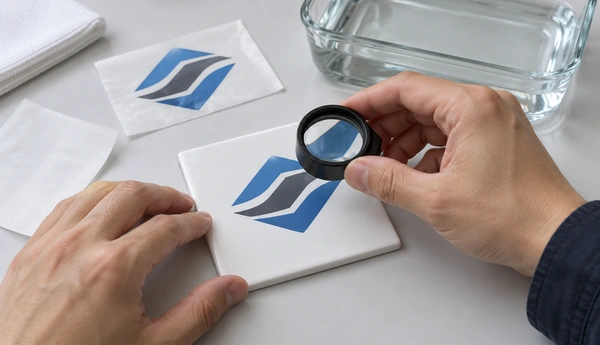
For a hydrographic job under review, record the selected film, activation and dipping procedure, receiving-part preparation and finishing steps. Take samples through rinsing, drying and the specified coating. Inspect coverage and image appearance on the actual part geometry. Keep the consumable supplier involved when assessing compatibility.
Use the following checks to organize the trial report. Set numerical limits and test methods from the product specification.
| Trial stage | What to record and inspect |
|---|---|
| Incoming carrier | Grade, batch, preparation conditions, dimensions and surface condition |
| Printed and dried material | Layer alignment, image detail, dimensional change and handling marks |
| Material after the planned hold | Blocking, print pickup, carrier condition and ability to transfer |
| Transferred image | Release or coverage, placement, distortion, bubbles and missing detail as applicable |
| Finished product | Appearance and the adhesion or durability tests required for its use |
Label each finished sample with its printing pass and position in the roll. Retain the corresponding carrier sample where possible. If a defect first appears during transfer, those records let the suppliers compare it with the earlier printed condition.
Use the actual receiving material and finish. For coated parts, record the coating system and preparation. Where appearance depends on the underlying color, test the specified color. Add the required abrasion, adhesion or exposure checks after the agreed conditioning period; their methods and limits belong in the buyer’s acceptance specification.
Keep the approved carrier, inks and receiving surface identified in the report. Record any substitution and review it before a repeat trial.
Build the quotation around the complete job
Estimate output from a timed run using the intended printing sequence. Record setup time, rejected material, stable running time, drying and handling between passes. State whether the reported output is accepted printed repeats or accepted finished transfers. Keep the later application-stage output separate if it is outside the machine quotation.
Prepare the enquiry with these items:
- The water-transfer route, exact carrier grade and reel specification.
- A complete artwork repeat and drawing of each printed layer.
- Consumable technical instructions, drying requirements and material preparation conditions.
- Registration limits and representative receiving products.
- The finished-sample acceptance procedure and planned storage conditions.
- Target accepted output, available installation space and local utilities.
Request a configuration drawing and a list of included equipment. Clarify responsibility for cutting, water application, rinsing and finishing where the selected process needs them. The screen printing machine RFQ checklist covers the wider purchasing enquiry.
Send the application brief through Winshol’s contact page. A useful proposal should connect the chosen machine configuration to the approved materials, full printing sequence and measured transfer samples.
Common questions
1. What should I specify first for a water transfer film screen printer?
Identify the transfer process and carrier grade. Add the receiving product, ink system and finished-image requirements. State whether the carrier is supplied as rolls or sheets, then provide the complete artwork and the consumable supplier’s application instructions.
2. Are water-slide decals and PVA hydrographic films the same application?
They use different carrier constructions and application methods. A water-slide decal separates from a backing and is positioned on a surface. Hydrographic film is used with activation and dipping. Identify the route before selecting printing and drying equipment.
3. Which Winshol machines list water-transfer applications?
The WL-5080CCD catalogue lists water-transfer films; the WL-5080DW lists water-transfer printing. Both are roll-fed screen printing configurations. Their application entries do not establish compatibility with every carrier, ink or later transfer process.
4. Can these machines print any PVA hydrographic film?
PVA-grade compatibility needs confirmation. Supply the actual film and ink system for a handling, printing and drying trial, then test transfer onto the receiving part. The catalogue does not identify a qualified PVA grade or activator recipe.
5. What print size do the two models support?
Both list a 500 × 800 mm maximum print area, an 800 mm maximum feed length and an 800 × 1000 mm screen frame. Maximum web width is 520 mm for the WL-5080CCD and 510 mm for the WL-5080DW. Review the full layout, marks and feed orientation.
6. Is the WL-5080DW a CCD registration machine?
It is listed with three-point registration and a single-color configuration. The WL-5080CCD is listed with CCD visual registration. Obtain measured samples for the alignment requirements of the proposed job; neither entry states a numerical registration guarantee.
7. What drying temperature should I use for water transfer film?
Use the selected ink and carrier suppliers’ technical instructions. Confirm temperature, exposure time, airflow and cooling on the proposed equipment. A recipe for transfer paper or one ink series cannot establish the conditions for a different film construction.
8. What should a machine acceptance trial include?
Include carrier handling, the full printing sequence, dimensional and registration measurements, and the actual water-transfer procedure. Inspect the finished receiving product. Add a stored-sample check when printed transfers will be held before application, and agree the acceptance limits before the run.
